HTC S730
 i
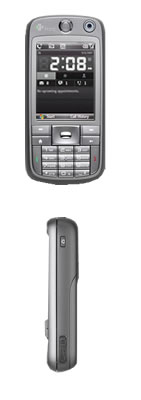
iI recently took delivery of my new work phone, an HTC S730.
I’ve previously used an Ipaq to manage my work calendar, and I’ve been looking forward to having all those features in a single device.
The phone arrived in a very stylish box. Once I’d removed the dust/promotional sleeve, all that remained was a completely black box with a single HTC logo on top. The lid was attached magnetically to the front of the box, and this elegant solution caused quite a stir in the office.
Beneath the lid was a cut-out piece of black foam with a few graphic elements, the phone itself, and a cardboard cut-out of one of the phone’s distinctive features: the slide-out QWERTY keyboard.
Beneath the foam rubber and more cardboard lay the phone’s accessories: a headset, a charger (with mini-USB), a USB cable, and the obligatory selection of CDs and paperwork.
Anyway, I unpacked the phone and inserted the SIM card and battery. After charging, it booted up and the set-up began. Microsoft’s mobile OS is sophisticated, and it’s a bit tricky to find your way around, no matter where you’re coming from (I’ve had phones from Nokia, Siemens and SE), but bit by bit I managed to set up the data connection and customise the phone to my liking.
The sheer number of options can be a bit confusing, especially as the setup and apps aren’t 100 per cent separate.
The phone obviously needed to be connected to our local Exchange server, and this is where the OS really came into its own. It was quick and painless, requiring just a few details (the server name and standard login details). The first connection to the server prompted the phone to ask me to enable automatic locking. A clever move from a data security perspective.
Integration with Exchange is the be-all and end-all of this phone. I can view all my emails (in all the folders I’ve chosen to synchronise), my calendar, contacts and tasks. I can both read and reply to emails, and I can manage my calendar by accepting new appointments.
If I’ve left the office without the phone number of a necessary contact, I can easily search the company’s contact database.
It’s a bit tricky to switch between apps, and it can be difficult to work out how to close them after use so they don’t take up unnecessary RAM. I also haven’t yet worked out exactly what indicates that the phone is online, but although it seems to be online almost constantly, the battery seems to be holding up well, with only around 15% used after one day.
The phone is thick and a bit heavy. That’s the price you pay for the built-in QWERTY keyboard. On the other hand, the keyboard makes it easy to send a text message or reply to an email. The keys are similar to standard mobile phone keys, and your thumbs are the only ones you can really use… But the full keyboard makes the phone much more comfortable to use in practice.
The built-in camera is 2 megapixels, but without a flash or autofocus, it’s not even useful for photographing whiteboards. There’s a VGA camera for video calls.
The photos of the packaging were taken with the rear camera.
I’m sure there are loads of features in this phone, but having seen the Exchange integration, I’m completely satisfied. I don’t think I’ll be making much more of it in the near future.